
Home / Networking, IoT & CCTV / Farm Wi-Fi & solar CCTV guide
Guide · Farm connectivity
Farm Wi-Fi and solar CCTV: a practical guide
How to get a reliable connection from the house to the sheds, pumps and gates, and run cameras where there is no power.
Most farms have decent internet at the house and nothing at the sheds, the pumps, the silos or the front gate. Closing that gap lets you watch cameras, check pumps and tanks, and make calls over Wi-Fi where there is no mobile signal. This guide explains how farm-wide networks and solar-powered CCTV are put together, and what to get right so they keep working through a Riverina summer.
Start with what you want it to do
- See who comes through the front gate
- Watch sheds, fuel, chemical stores and machinery
- Check pumps, tanks and silos without driving out
- Wi-Fi in the sheds and workshop for phones, tablets and machinery
- Wi-Fi calling where mobile coverage drops out
- Room to add sensors and automation later
Write the list first. It decides where the network has to reach and how much each link has to carry. A camera needs a few megabits per second. A tank sensor needs almost nothing.
Step 1: Get internet onto the property
- NBN: fixed line or fixed wireless, where it is available
- Mobile broadband: 4G or 5G, with an external antenna where the signal is marginal
- Satellite: including the newer low-earth-orbit services, which reach most of rural Australia
Any of these can feed a farm network. What matters for cameras is upload speed, because viewing from your phone sends video out of the property. Footage is normally recorded on site, so cameras only use your data allowance when you watch remotely or an alert is sent.
Step 2: Move it around the farm
- Point-to-point wireless links: a pair of directional radios that carry the network between buildings, often several kilometres apart. They need a clear line of sight, with room around the direct line as well, so trees, sheds and silos near the path matter. Mount them high and solid: a pole that sways in the wind drops the link
- Point-to-multipoint: one base radio on a high point, such as a silo or tower, serving several sites around it
- Cable and fibre: copper network cable is limited to 100 metres a run. Fibre goes much further, and between buildings it is not affected by lightning or by differences in earthing
- Access points: outdoor-rated Wi-Fi at each shed, yard or house for local coverage
- Mesh Wi-Fi: good for filling in coverage around a group of buildings. Each wireless hop shares capacity, so over long distances dedicated links do the heavy lifting
- Long-range sensor networks: low-power radio for tank levels, soil moisture and gates. It carries very little data, but reaches a long way on small batteries
The outdoor links used on farms run in radio bands covered by a class licence in Australia, so you don't need your own radio licence. The equipment does have to be set to the Australian rules and power limits.
Step 3: Power where there is no power
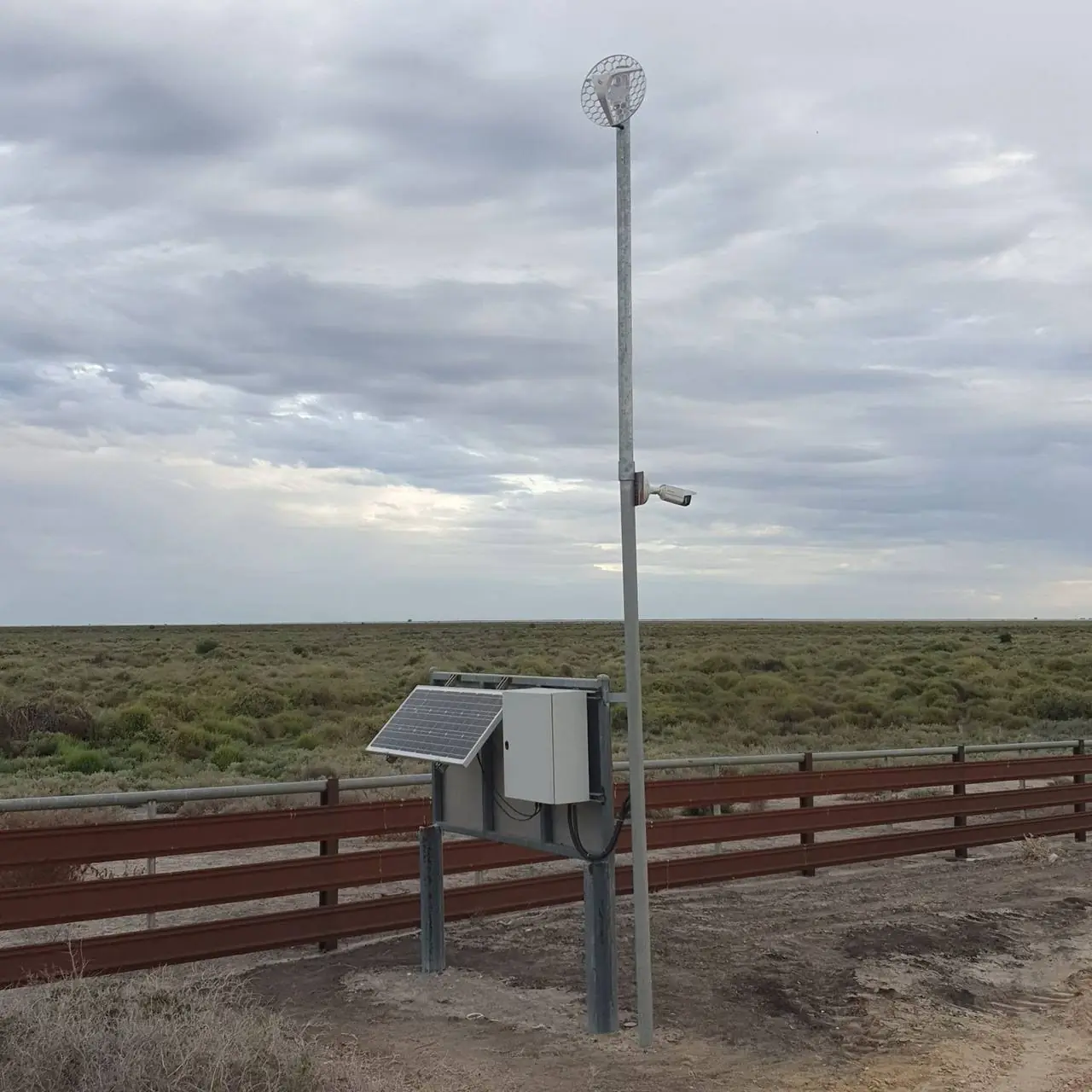
A remote camera or link site runs from a solar panel, a battery and a charge controller in a weatherproof enclosure. Sizing it is simple arithmetic:
- Add up the load. Camera, radio, network switch and any 4G modem, in watts, including the camera's infrared lights at night.
- Work out a day's energy. Multiply by 24 hours, then add about 30% for losses.
- Size the battery for bad weather. Three to five days without sun is a common allowance.
- Size the panel for midwinter. Short days and a low sun mean much less energy in June than in January.
A worked example. A camera and radio drawing 15 W use 360 Wh a day, or about 470 Wh with losses. Three days without sun needs about 1.4 kWh of usable battery: around 120 to 150 Ah of 12 V lithium, or roughly double that in lead-acid, which should not be run below half charge regularly. If midwinter gives the panel about three hours of full sun a day, 160 W of panel only just breaks even, so 250 to 300 W is a more sensible choice to recharge after a cloudy spell. These are example figures only.
Heat is the other enemy. A sealed box in full sun on a 45 degree day cooks batteries and electronics. Use a light-coloured, shaded and ventilated enclosure, tilt the panel steeply to the north for winter sun, and keep the dust off it.
Step 4: Choose and place the cameras
- Gates and driveways: reading a number plate needs a camera aimed and set up for plates. Use a second camera for the wide view
- Sheds and yards: wide-angle cameras with good night vision, mounted high enough to be out of reach
- Distant yards and pumps: a long-range or pan-tilt-zoom camera
- Recording: a recorder on site, somewhere secure and cool. Higher resolution and continuous recording fill the disk faster, so decide how many days you want to keep
- Alerts: set them for people and vehicles, not every moving branch
- Power: cameras powered over the network cable (PoE) need only one cable each
Need help with this at your plant? Send us the scope, drawings or a few photos and an engineer will reply within one business day.
Keep it reliable
- Surge protection and proper earthing on poles and cable entries. Lightning finds long cable runs
- UV-rated cable, glands and conduit, and enclosures that keep out ants, mice and birds
- Monitoring that tells you when a link, camera or battery drops out
- A network diagram and a record of what is where
- A battery and panel check before each winter
Keep it secure
- Change every default password, and keep the passwords yourself
- Keep camera, recorder and radio firmware up to date
- Put cameras and pump or plant controls on their own network, separate from the house and guest Wi-Fi
- Don't open ports on the router for remote viewing. Use the manufacturer's secure remote access or a VPN
- Know who has access, and remove it when people leave
Rules to know in NSW
- Security licence: installing CCTV for someone else is a licensed security activity in NSW. The installer needs a Class 2 security licence and must work for a master licence holder
- Data cabling: fixed data cabling that connects to the telecommunications network must be installed by an ACMA-registered cabler
- Electrical: any mains-voltage work needs a licensed electrician
- Staff: if cameras cover places where employees work, the NSW Workplace Surveillance Act generally requires written notice 14 days before they start, cameras that are clearly visible, and signs at the entrances
- Privacy: aim cameras at your own property, and never put them in toilets, showers or change rooms
Questions to ask an installer
- Do you hold the security, cabling and electrical licences for this work?
- Will you survey the site and check line of sight before quoting?
- What happens after three cloudy days in July?
- Who holds the passwords and owns the footage?
- Can the system grow to more cameras, sheds and sensors?
- Who do I call when something stops working?
How AMC helps
AMC designs and installs farm-wide networks, long-range wireless links, solar-powered camera poles and remote monitoring across the Riverina. We hold a NSW company security licence and ACMA cabling registration. We are also industrial electricians and automation engineers, so the same network can carry pump control, tank levels and alarms. On one rural property we designed and installed a farm-wide Wi-Fi mesh and long-range HD CCTV, including solar-powered camera poles where there was no mains power.
This guide is general information, not legal advice. Solar and network sizing depends on the equipment and the site. Written by the AMC Electrical & Automation engineering team in Griffith, NSW. Last checked November 2026.
FAQs
Common questions about farm Wi-Fi and solar CCTV
How far can farm Wi-Fi reach?
An ordinary outdoor access point covers the area around a shed or house. To go further, point-to-point wireless links carry the network between buildings, often over several kilometres, as long as there is a clear line of sight.
Do wireless links need line of sight?
Yes. The radios need to see each other, with some clear space around the direct line as well. Trees, sheds, silos and rising ground in the path weaken or block the link, which is why a site survey comes first.
Can solar-powered CCTV run all night and through winter?
Yes, if it is sized for it. The battery has to carry the load overnight and through several cloudy days, and the panel has to be big enough to recharge it in midwinter, when there is much less sun than in summer.
Does farm CCTV use a lot of internet data?
Usually not. Footage is recorded on site, so data is only used when you watch remotely or an alert is sent. Cameras that upload everything to the cloud over 4G use much more.
Can I get Wi-Fi calling in the sheds?
Yes. Most current phones and the major Australian carriers support Wi-Fi calling, so once the farm network reaches a shed you can make and take calls there without mobile coverage.
Do I need a licence to put cameras on my own farm?
You can fit cameras on your own property yourself. A business that installs security cameras for others in NSW must be licensed, fixed data cabling must be done by a registered cabler, and mains-voltage work needs a licensed electrician. If the cameras cover employees, the workplace surveillance rules apply.
Can the same network run pumps and sensors?
Yes. A farm network can carry pump control, tank and silo levels, alarms and cameras. Keep control equipment on its own secured network. See irrigation pump control.
Next step
Got a plant, machine or board that needs sorting?
Send us the scope, drawings or a few photos. An engineer reads every request and comes back within one business day with next steps and a clear, upfront price.
Project engineer or OEM? Send a P&ID, equipment list or scope for a budget price.