24/7 breakdown support across the Riverina0427 997 730[email protected]

Home / Legacy PLC migration / PanelView HMI replacement

GUIDE · PanelView HMIs

PanelView and PanelView Plus HMI replacement

What to do when an Allen-Bradley operator screen is failing or can't be bought any more: the options, what converts, what doesn't, and how to swap it in a short stop.

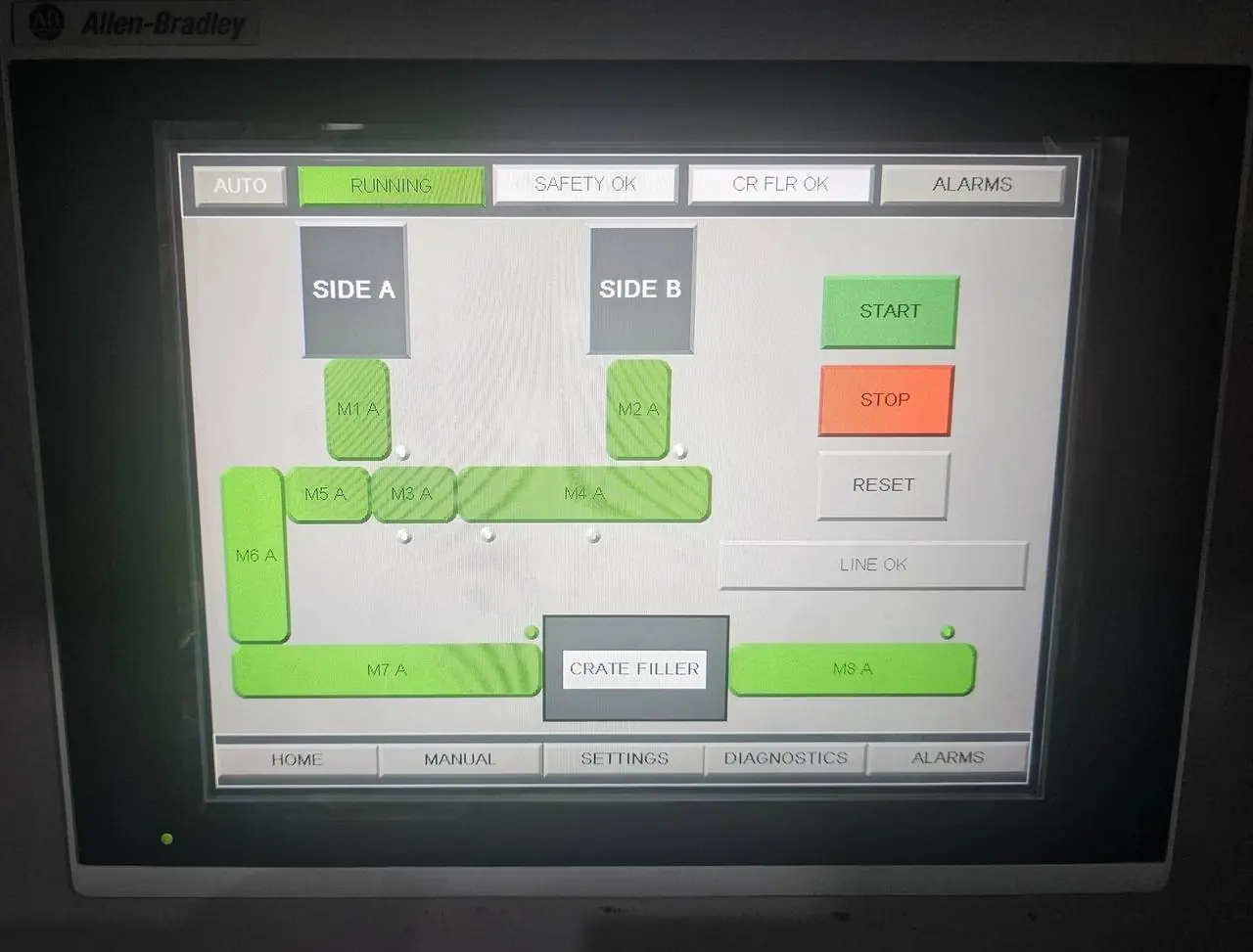
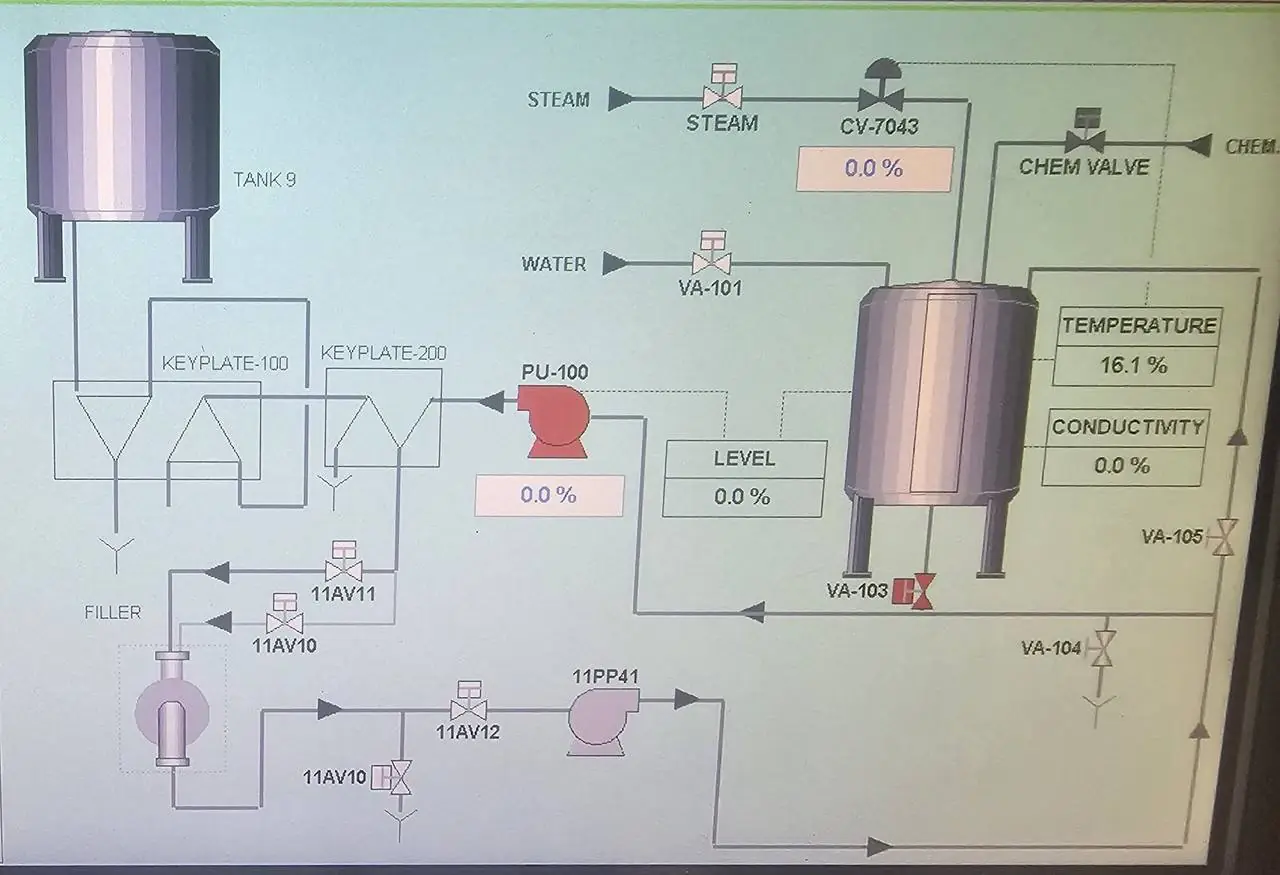
Operator touchscreen showing the packing line conveyor overviewCIP system operator screen designed by AMC

GUIDE · PanelView HMIs · What we do

When the screen dies, nobody can run the machine.

Operator screens have a harder life than the PLC behind them. Backlights dim, touch panels wear and keypads crack. When an older PanelView fails, the PLC may still be running perfectly, but nobody can start the line, change a setpoint or see an alarm.

PanelView Standard terminals and the earlier PanelView Plus and Plus 6 ranges are legacy products, and Rockwell Automation publishes migration guides from them to PanelView Plus 7. Replacing one is more than a hardware swap. The application has to be converted, the door cutout may differ, and the way the screen talks to the PLC often has to change.

AMC designs and programs PanelView and FactoryTalk View screens, and works with the SLC 500, PLC-5, MicroLogix and Logix controllers behind them. We can replace a screen on its own, or as the first stage of a wider control system migration.

What we do

  • Recovering and backing up HMI applications
  • PanelView Standard to PanelView Plus 7 conversions
  • PanelView Plus and Plus 6 upgrades
  • Screens rebuilt with clearer alarms and diagnostics
  • Tag re-addressing after a PLC migration
  • Door cutout changes and adapter plates
  • Ethernet links to replace DH-485, DH+ and Remote I/O
  • Operator training on the new screens

Standards, platforms & tools

PanelView StandardPanelView PlusPanelView Plus 6PanelView Plus 7FactoryTalk View MEFactoryTalk View SEEtherNet/IP

Replacement options

Which screen replaces which.

The best replacement depends on the PLC behind the screen as much as the screen itself.

01

PanelView Plus 7

The usual replacement for PanelView Standard, PanelView Plus and Plus 6. It runs FactoryTalk View Machine Edition applications, so existing PanelView Plus projects carry across with the least rework.

02

Standard or Performance

PanelView Plus 7 comes in Standard and Performance versions. The Standard version has limits on controller connections, screens and alarms. Check the current Rockwell manual against your application before ordering.

03

Other Rockwell screens

PanelView 5000 and FactoryTalk Optix are Rockwell's other HMI families. Both mean rebuilding the screens, so they suit a full PLC and HMI migration more than a like-for-like swap. AMC works with both. Check their status and controller compatibility first.

04

Keep the PLC, change the screen

This works when the new screen can reach the old PLC, which in practice means Ethernet. An SLC 5/05, an Ethernet PLC-5 or a MicroLogix 1100 or 1400 is the simple case.

05

Old networks

A screen on DH-485, DH+ or Remote I/O has no direct equivalent. The choices are a gateway, an Ethernet upgrade on the PLC, or migrating the PLC as well.

06

Change both together

If the PLC is also legacy, replacing the screen and controller in one project avoids doing the tag addressing twice. See the SLC 500 and PLC-5 migration guide.

Swapping a screen

Convert and test first. Then the swap is short.

A screen swap is one of the quicker legacy jobs, as long as the application is converted and tested before the old screen comes out.

We start by recovering the application, from your files or by uploading it from the terminal. It is converted or rebuilt for the new screen, with tags pointed at the PLC and the alarms and navigation checked screen by screen. Where we can, we test it against the PLC program in our workshop. The door cutout is measured and any adapter plate or door work is organised ahead of time.

On site, the old screen comes out, the new one goes in, and every button, setpoint and alarm is checked against the machine with your operators. The old terminal is kept as a fallback until the new one has run production.

  • Recover and back up the old application
  • Choose the replacement and check its limits
  • Convert or rebuild the screens
  • Sort out communications to the PLC
  • Measure the cutout and arrange adapters
  • Swap, test every screen and train operators
  • Hand over the application files

Proof

See it on the job.

See operator screens we designed for a citrus packing conveyor and an automated CIP system, and our legacy control system upgrades.

Where we work

Griffith-based. Riverina and Australia-wide.

We replace PanelView screens for sites across the Riverina and Australia-wide.

GriffithLeetonYendaHanwoodYoogaliNarranderaDarlington PointColeamballyHayHillstonWagga WaggaMildura

Legacy terminals

PanelView families and where they go

Status last checked on Rockwell Automation's website on 15 November 2026. It changes over time and differs by catalogue number, so look up your exact part on Rockwell's Product Lifecycle Status page before you decide anything.

FamilyCatalogueDesign softwareWhat Rockwell publishesUsual replacement
PanelView Standard (300, 550, 600, 900, 1000, 1400)2711PanelBuilder32Legacy PanelView to PanelView Plus 7 catalogue number conversion guidePanelView Plus 7
PanelView Plus (original)2711PFactoryTalk View MEMigration guides to the later PanelView Plus rangesPanelView Plus 7
PanelView Plus 62711PFactoryTalk View MEPanelView Plus 6 to PanelView Plus 7 migration guidePanelView Plus 7

Check the status of the replacement as well as the old screen. HMI ranges turn over faster than PLCs.

What converts and what doesn't

  • PanelView Plus and Plus 6 applications open in current FactoryTalk View Machine Edition and are rebuilt as a runtime file for the new terminal. Resolution can change, so every screen needs a visual check.
  • PanelView Standard applications can be imported into FactoryTalk View Machine Edition as a starting point. Alarms, fonts, sizes and some objects need rework.
  • Keypad to touch (or touch to keypad) means redesigning how operators do things, not just copying screens.
  • No application file? It can usually be uploaded from a working terminal. A PanelView Plus runtime file can often be restored to an editable project, unless that was blocked when it was made.
  • A like-for-like copy is the minimum. It is also the cheapest time to fix alarm messages nobody understands.

Communication changes

  • Older terminals were sold with DH-485, DH+, Remote I/O, DeviceNet, ControlNet, serial or Ethernet ports. PanelView Plus 7 is built around EtherNet/IP.
  • A screen on Remote I/O is scanned by the PLC like an I/O rack, often with block transfers. That PLC logic has to be removed or changed when the screen moves to Ethernet.
  • Check what else shares the link. A DH-485 or DH+ network may have other screens and PLCs on it.
  • After a PLC migration, every screen tag is re-pointed to the new controller's tags.

Fitting it in the door

  • Cutouts differ between families and sizes. Adapter plates exist for some combinations. Others need the door cut or replaced.
  • Check the depth behind the door, the supply voltage (older screens may be AC powered) and the enclosure rating.

Risks

What catches people out.

  • No backup of the application. A dead screen then means a rebuild from photos and memory.
  • Design software that only runs on an old operating system
  • Second-hand terminals with worn backlights and unknown firmware
  • A replacement that can't reach the PLC over the existing network
  • Limits on controllers, screens and alarms in the lower-cost models
  • Operators who first see the new screens on the day they go live

For a quote

What to send us.

  • The full catalogue number and series from the label on the back, for example 2711-T10C8 or 2711P-T10C4D8
  • Photos of the screen running: main, alarm and setup screens
  • The application file if you have it (.pba or .pva for PanelView Standard, .apa or .mer for PanelView Plus)
  • The PLC model and how the screen connects to it
  • The cutout size, and photos of the door inside and out
  • Anything the operators want fixed while we are there

Send it through our contact page or call 0427 997 730. If you don't have half of this, send what you have.

FAQs

Common questions

Is the PanelView Plus 6 discontinued?

PanelView Plus 6 is a legacy range, and Rockwell Automation publishes a migration guide from it to PanelView Plus 7. Availability differs by catalogue number, so look yours up on Rockwell's Product Lifecycle Status page for the current status.

What replaces a PanelView 600 or PanelView 1000?

These PanelView Standard terminals are normally replaced with a PanelView Plus 7 of a similar size. Rockwell publishes a catalogue number conversion guide from legacy PanelView terminals to PanelView Plus 7. The application is imported into FactoryTalk View Machine Edition and reworked.

Can my existing PanelView application be converted?

Usually. PanelView Plus applications carry across to PanelView Plus 7 with the least change. PanelView Standard applications can be imported as a starting point, then need rework and testing. Moving to PanelView 5000 or FactoryTalk Optix means rebuilding the screens.

Will a new PanelView work with my SLC 500 or PLC-5?

It depends on the link. If the PLC has Ethernet, usually yes. If the old screen is on DH-485, DH+ or Remote I/O, you need a gateway or a comms upgrade, or it may be time to migrate the PLC too. See our SLC 500 and PLC-5 migration guide.

We don't have the application file. Can it be recovered?

Often. If the terminal still powers up, the application can usually be uploaded from it. If the screen is dead and there is no backup, the screens have to be rebuilt from the PLC program, photos and what the operators remember. That is why a backup now is worth having.

Will the new screen fit the old cutout?

Not always. Cutouts differ between families and sizes. Adapter plates are available for some combinations. Otherwise the door is modified or replaced. We check this before ordering.

Do you replace other brands of HMI?

Yes. We design operator screens on other platforms too. See PLC and SCADA programming.

Next step

Got a plant, machine or board that needs sorting?

Send us the scope, drawings or a few photos. An engineer reads every request and comes back within one business day with next steps and a clear, upfront price.

Project engineer or OEM? Send a P&ID, equipment list or scope for a budget price.

Call nowEmailGet a quote